
Admin UI
Admin UI
The Knova admin UI is where your team operates Knova. It gives operations, treasury and compliance teams one view of assets and balances across their custodians and networks, a live feed of transactions, a place to build and manage automations, and Knova AI, an assistant that works in plain language. Everything in the UI is also available through the API and MCP.
Dashboard
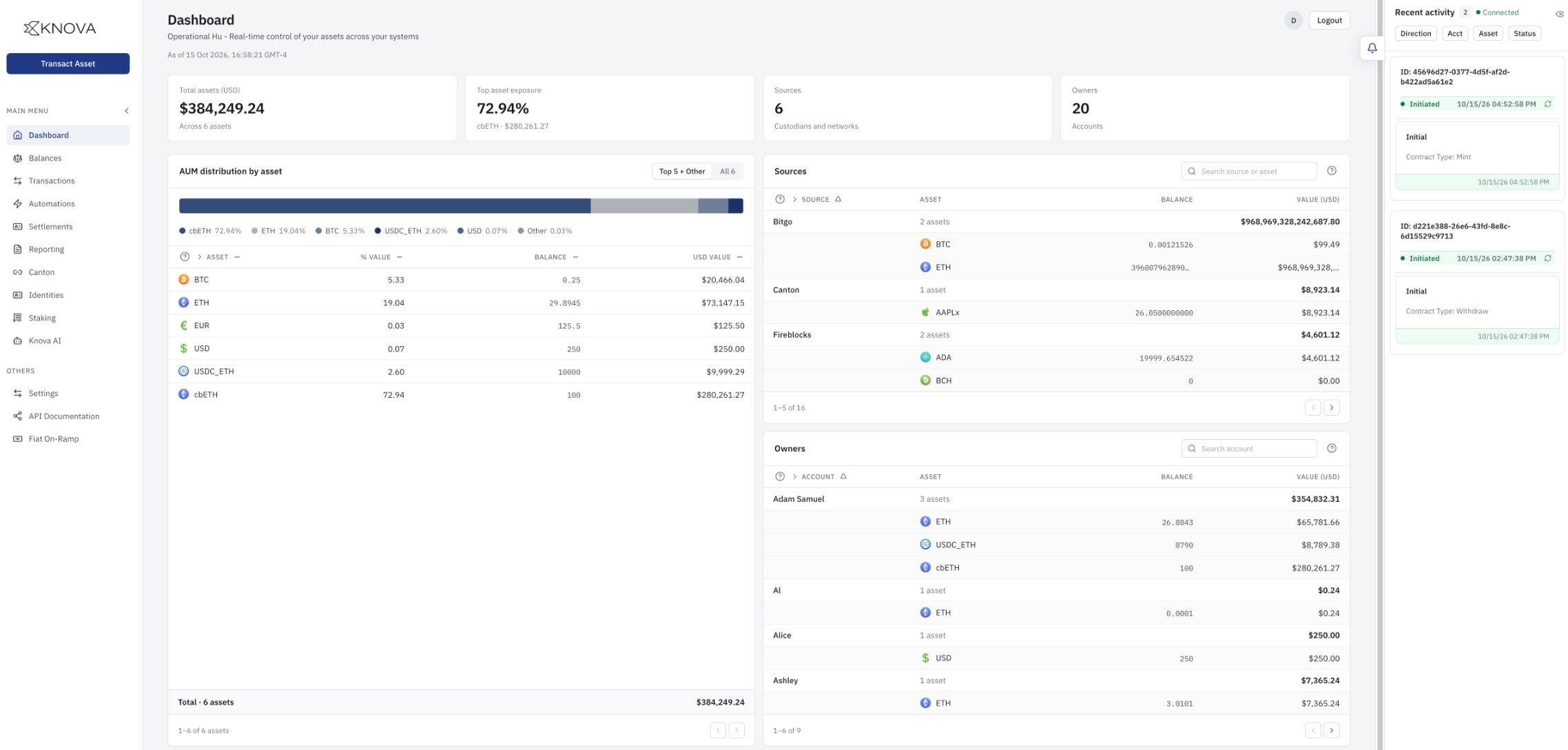
The dashboard shows where your assets are and what is happening to them. The components shown here are configurable and for illustrative purposes for this page.
- Summary. Total assets in USD, your largest single-asset exposure, and the number of sources (custodians and networks) and owners (accounts) Knova is tracking.
- AUM distribution by asset. A breakdown of assets under management, with each asset's share, balance and USD value.
- Sources. Balances by custodian and network, expandable to the assets held at each one.
- Owners. Balances by account, expandable to each account's assets.
- Recent activity. A live feed of transactions as they move through their steps. Each entry shows the transaction ID, status, type (for example a mint or a withdrawal) and time. Filter by direction, account, asset or status.
Menu
| Menu item | What it is for |
|---|---|
| Dashboard | The overview above. |
| Balances | Balances by asset and by account. |
| Transactions | Transactions and their status. |
| Automations | Build, enable, disable and run rules, and review their runs. See Automations. |
| Settlements | Settlement activity across your sources and networks. |
| Reporting | Reports on assets and activity. |
| Canton | Example network specific screen- Activity and operations on the Canton network. |
| Identities | The identities of your accounts and owners. |
| Staking | Example yield generating strategies- Staking positions. |
| Knova AI | The assistant described below. |
| Settings | Configuration for your deployment. |
| API Documentation | The Knova API reference. |
| Fiat On-Ramp | Moving between fiat and digital assets. |
Transact Asset is available from any page. Use it to start a transaction without leaving what you are doing.
Knova AI
Knova AI is the assistant built into the admin UI. Ask a question, or describe a rule in plain language. When it drafts an automation, the draft opens in the same form you would use to build one yourself, so you can review and change it before it is saved. New automations start disabled until you enable them. See Knova Agent.
Access and security
- Sign-in goes through your identity provider.
- Roles and permissions decide what each user can see and do, in the UI and in the API.
- Audit trail. Actions are recorded, including those made through Knova AI.
See the Security Overview.
Runs in your environment
Like the rest of Knova, the admin UI runs inside your environment and behind your firewalls.
Also available through the API and MCP
Your own systems can do what the UI does through the API, and an AI agent can do it through MCP. Both work under the same permissions and policies.
Updated about 2 hours ago