
Self-Serve Connectors
Connect to the systems you already have, and new you want to reach.
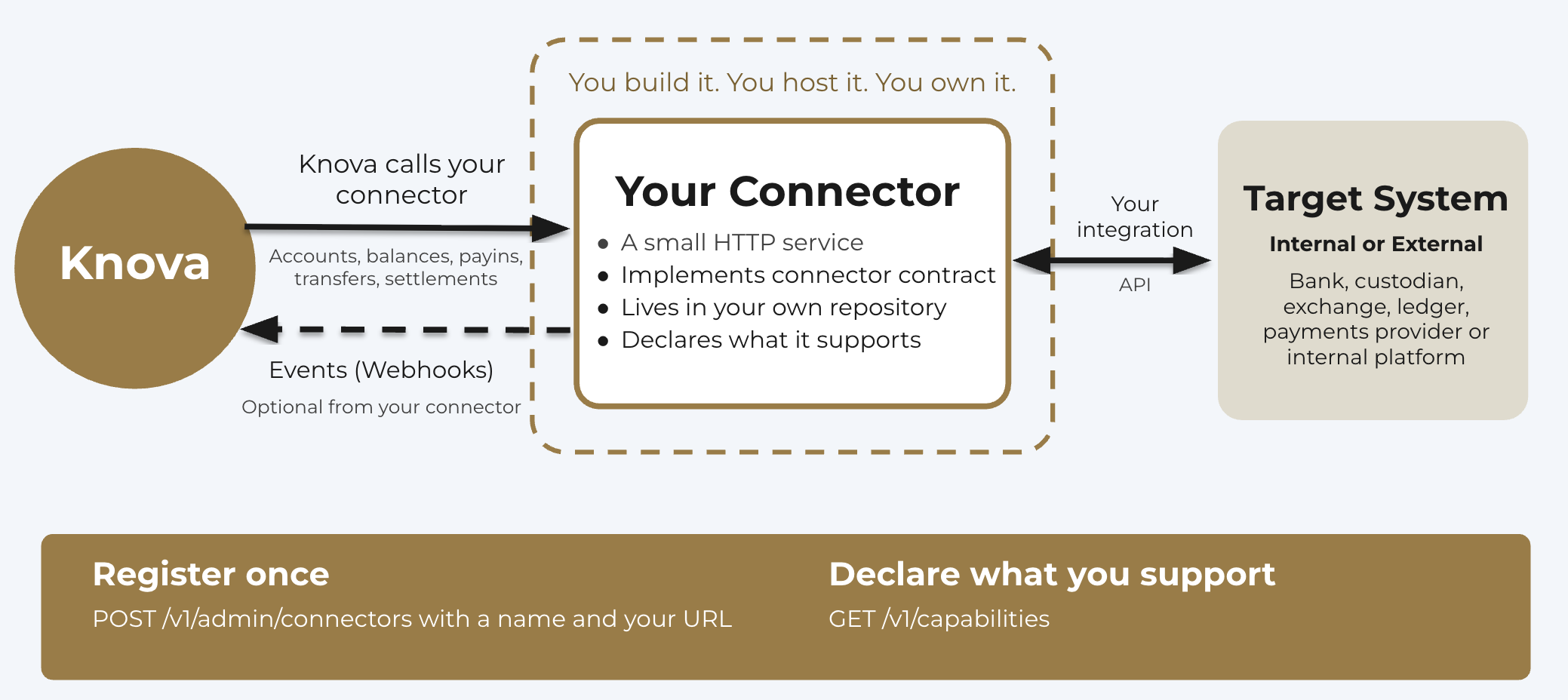
Financial institutions run on many systems: core banking, payment processors, custodians, exchanges, ledgers and internal platforms. Each has its own interfaces, data formats and standards, and no single integration fits them all. Knova gives you a standard way to connect any of them: a connector you build, host and own, that Knova calls through a published contract.
Why self-serve
- You own it. The connector lives in your repository and runs where you host it. The code and IP are yours. Knova needs only the URL of your running service.
- No wait for a release. Knova adapts to what each connector declares it supports, so a new connector needs no connector-specific changes on the Knova side.
- Implement only what you need. Start with read-only accounts and balances, and add transfers later.
- Built by anyone. You, a partner, or Knova can build a connector against the same contract.
How it works
- Build an HTTPS service that implements the connector contract.
- Host it where you choose, at a URL Knova can reach.
- Register it with
POST /v1/admin/connectors, giving a name and the URL. - Declare what it supports at
GET /v1/capabilities. Knova uses only those capabilities.
Knova calls your connector, not the other way around. Your connector is the server: you implement the endpoints, and Knova sends requests to them. The only calls that go back to Knova are the events your connector chooses to push.
Knova then mirrors accounts, balances and asset codes from the connector and sends it transfers. Anything specific to your system travels in connector_data, validated against schemas your connector publishes.
What a connector covers
- Accounts: list, read, open and close.
- Balances: every asset balance an account holds.
- Payins: instructions for paying an asset into an account.
- Asset codes: the assets the connector can hold and transfer.
- Transfers: accept a transfer, and look it up later.
- Settlements: settled movements the system reports.
- Extensions: extra endpoints your connector serves beyond the contract.
Your connector can also push state changes back to Knova as events. See Events and webhooks below.
Events and webhooks
Instead of waiting for Knova to poll, your connector can push changes to Knova as they happen, by sending a webhook. Knova reacts to these as soon as they arrive.
Events your connector can send:
- Transfer updated: a transfer changed status, for example from pending to succeeded or failed.
- Account updated: an account was opened, changed or closed.
- Pay-in received: funds arrived for an account.
- Balances updated: a fresh snapshot of an account's balances.
Every event carries an event_id and an occurred_at time. Knova uses event_id to ignore duplicates, so it's safe to retry a delivery, and occurred_at to discard events that arrive out of date.
Webhooks are signed with an HMAC signature, so Knova can verify that an event came from your connector. See Security section for more details.
You configure your connector with the base URL of your Knova deployment.
Reliable by design
- Safe retries: writes take an
idempotency-key, and the connector replays the stored result for a repeated key. - Your identifiers: account and transfer IDs come from your connector, and Knova treats them as opaque.
- One error shape across every endpoint.
The connector specification
The Connector API reference documents every endpoint your connector implements, with request and response schemas. It's a standard OpenAPI specification, so you can also download it and generate a server skeleton in your language of choice with any OpenAPI generator. Connector API reference subpage
Need something else?
Knova can also support ledger-level interoperability, such as hashed timelock contracts (HTLCs) and relay-based cross-chain communication, where a project requires it. Contact us to discuss your use case.
Get started
- Read this guide and the Connector API reference.
- Register your connector with
POST /v1/admin/connectors. - Declare what it supports at
GET /v1/capabilities. Knova uses only those capabilities.
Updated about 7 hours ago